
Steps Overview #
- Copy the original project folder and rename it
- Remove the old Git remote connection from the new project
- Upload the new project to GitHub and create a new repository
- Ignore /hugo.exe, /public/, and /resources
- Link to the new GitHub repository
→ If you forgot to ignore → 4.5. Add ignore rules + delete - Verify
- Deploy the new project
1. Copy the Project Folder #
# Run this in the parent directory of your project
robocopy [original-folder-name] [new-folder-name]  /MIR
When done, you should have:
Parent directory
├── [original-folder]
└── [new-folder]
Or use git clone
2. Remove the Old Git Remote from the New Project #
Navigate into the new project:
cd [new-folder]
Delete the old repo’s .git directory:
rmdir /S /Q .git
This ensures you won’t carry over:
- Old commits
- Old remotes
- Old branches
- Old GitHub repo links
Initialize a new Git project:
git init
Create the main branch:
git branch -M main
3. Create a New Repository on GitHub #
- Go to GitHub
- Click “+” in the top-right corner → “New repository”
- Enter
[new-folder-name]as the Repository name - Choose Public or Private
- Do NOT check “Initialize this repository with a README”
- Click “Create repository”
4. Configure .gitignore #
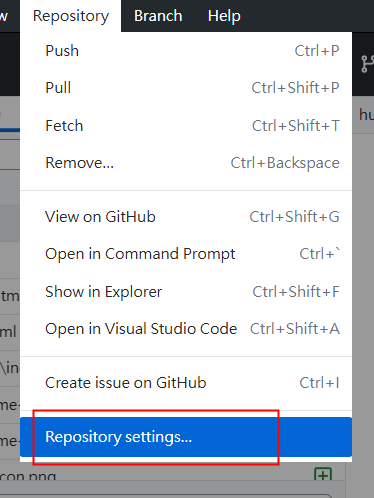
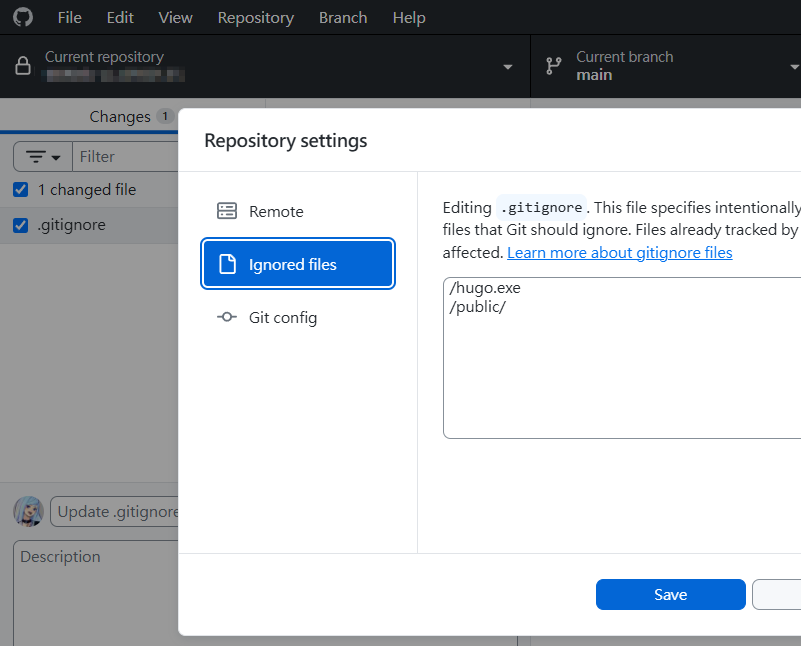
Set it up via GitHub Desktop:
GitHub Desktop → Repository → Repository settings...
In the Ignored files section, enter /hugo.exe, /public/, and /resources
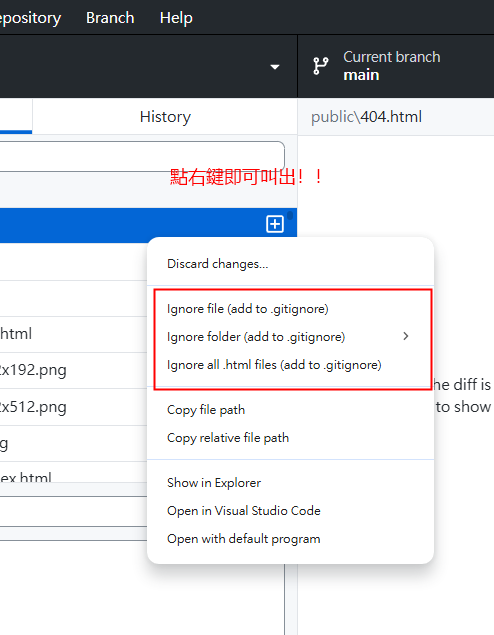
Alternatively, right-click a file → context menu → Ignored file, then enter /hugo.exe, /public/, and /resources in the Ignored files section.
5. Link to the New GitHub Repository #
# Add the new remote
git remote add origin https://github.com/[username]/[new-folder-name].git

# Push to the new repository
git push -u origin main
Note: If your default branch is
masterinstead ofmain, replacemainwithmasterin the commands above. Rungit branchto check your current branch name.
4.5. Add Ignore Rules + Delete #
If /hugo.exe, /public/, or /resources/ were accidentally uploaded,
you need to stop Git from tracking them first, then remove them from the remote.
Stop Tracking hugo.exe and public/ #
# 1. Remove from Git tracking (but keep the local files)
git rm --cached hugo.exe
git rm -r --cached public/
git rm -r --cached resources/

# 2. Verify that .gitignore is correct
# It should include:
# hugo.exe
# /public/
# /resources/
# If not → go back to Step 4 and configure ignore rules via GitHub Desktop

# 3. Commit the "stop tracking" changes
git add .gitignore
git commit -m "Stop tracking hugo.exe, public and resource folder"

# 4. Push to GitHub
git push
Delete These Files from GitHub #
The git push above already takes care of the deletion! Here’s why:
git rm --cached= tells Git “stop tracking these files”git commit+git push= syncs this “untrack” action to GitHub- hugo.exe and public/ will be removed from your GitHub repository
Verify the Result #
# Check local status
git status
# Should show: working tree clean
# hugo.exe, public/, and resources/ should not appear in the list

# Check GitHub
# Visit your GitHub repo page — hugo.exe, public/, and resources/ should be gone
Expected Outcome #
- Local: hugo.exe, public/, and resources/ folders still exist and work normally
- Git: These files are no longer tracked
- GitHub: These files have been removed
- Going forward: Any changes to these files will not be detected by Git
6. Verify #
# Confirm the remote connection
git remote -v
You should see:
origin  https://github.com/[username]/[new-folder-name].git (fetch)
origin  https://github.com/[username]/[new-folder-name]5.git (push)
Once complete, you’ll have two independent projects:
[original-folder-name]→ linked to the old GitHub repo[new-folder-name]→ linked to the new GitHub repo
7. Deploy the New Project #
Go to:
Cloudflare Dashboard
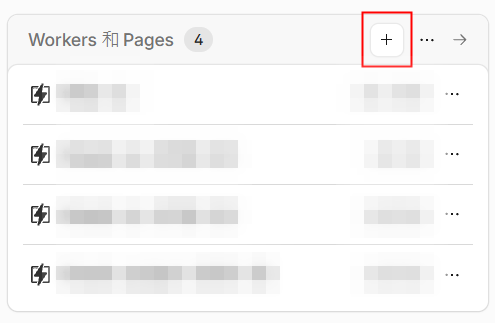
Under Workers & Pages, click [+] Create application
Select Pages
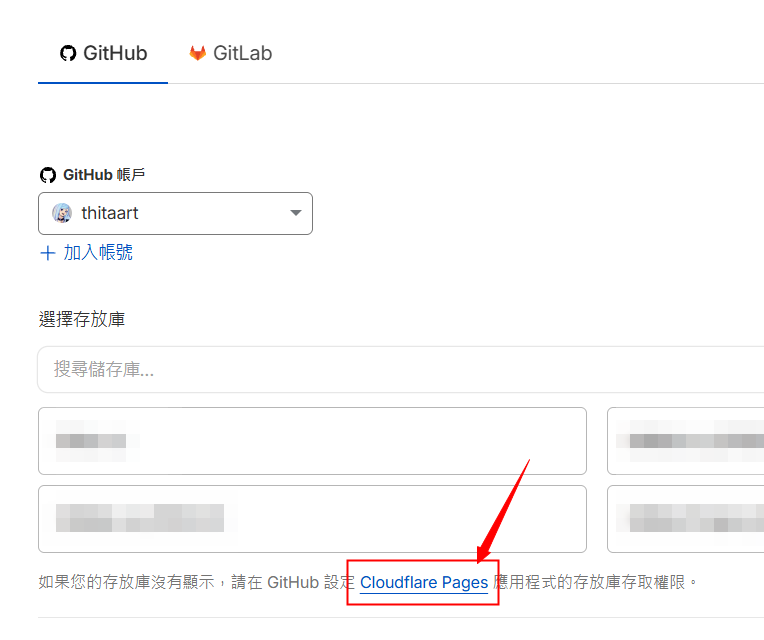
Connect your GitHub repo
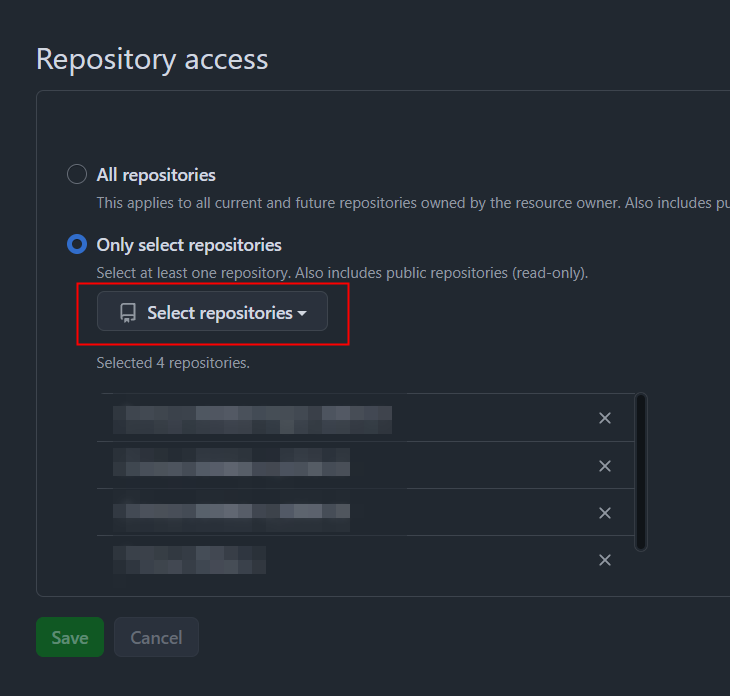
If the repo doesn’t appear, follow the on-screen instructions to configure GitHub app access permissions.
Build Settings #
Framework preset
None
Build command
hugo
Build output directory
/public
Environment variables
Variable name HUGO_VERSION = 0.1420
You can run the following in your terminal to confirm your Hugo version:
hugo version